Open Visual Trace Route version 1.6.2 released.
Download at Sourceforge.net
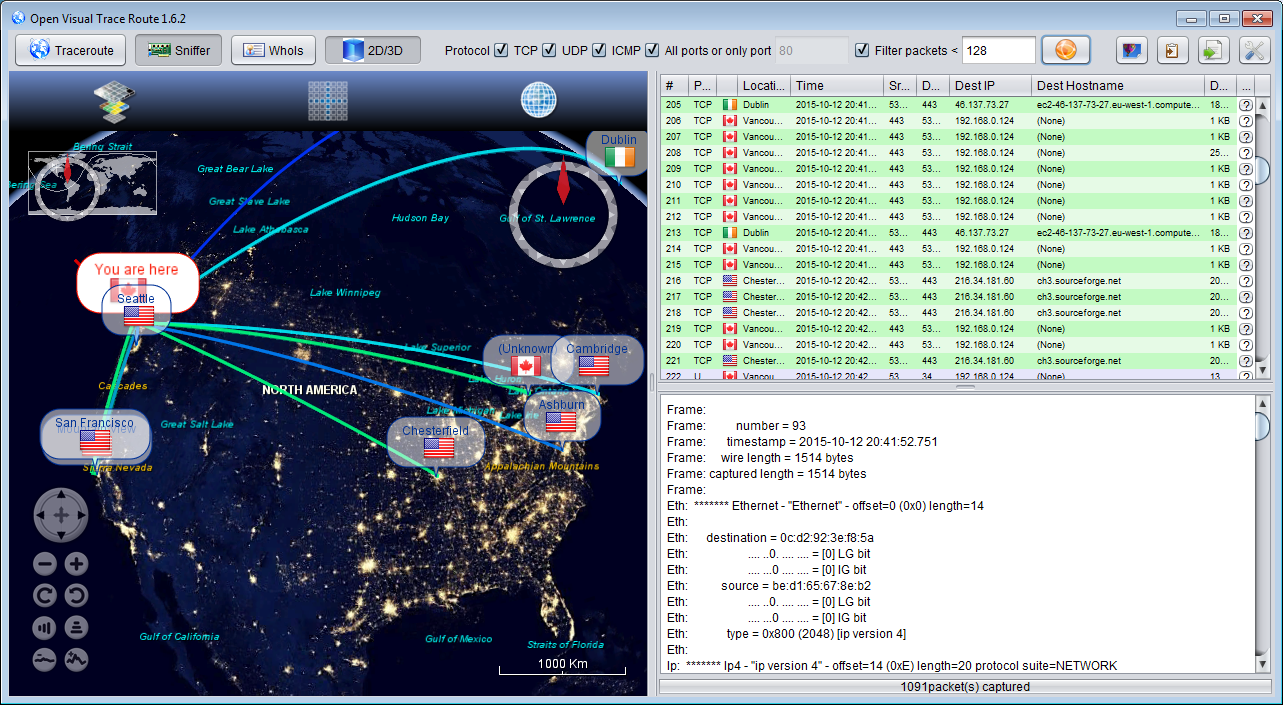
Release note :Version 1.6.2 is out. Here is what's new:
- Add whois feature in both traceroute and sniffer
- Fix duplicated route points during the traceroute
- Fix command+Q failed to close the application on MacOSX
- Fix bug on sorting on tables
- Update Geoip database
- Update public ip address provider
- Fix a bunch of issues
Showing posts with label Java. Show all posts
Tuesday, October 13, 2015
Sunday, May 4, 2014
Open Visual Trace Route version 1.5.0
Open Visual Trace Route version 1.5.0 released.
Download at Sourceforge.net
Release note :
* Add packet sniffer mode
* Add timeout for traceroute
* 2D map component using Openmap
* Upgrade to WorldWind 2.0
* Refactoring of code
* Use proper logger inside the code
Download at Sourceforge.net
Release note :
* Add packet sniffer mode
* Add timeout for traceroute
* 2D map component using Openmap
* Upgrade to WorldWind 2.0
* Refactoring of code
* Use proper logger inside the code
Sunday, February 16, 2014
Workaround the sun.nio.cs.FastCharsetProvider bottleneck
The CharsetProvider is the class that, given a String representation of a Charset gives you the corresponding Charset object.
This is typically used when you do a new String(bytes[], "UTF-8") or a Charset.forName("UTF-8").
Looking closer at the Charset class tells us that it is actually using two levels of caches :
and if cannot find you charset in the cache, will use the standardProvider which is a sun.nio.cs.StandardCharsets that extends sun.nio.cs.FastCharsetProvider which implementation is synchronized as you can see :
So if you are not lucky and uses more than two different encoding, you will go to this synchronized block and create a contention point in your application, as other people talked about here, here and also in this java ticket.
To prevent this issue from happening, we can directly use a Charset object since Java 1.6 in your code. But regarding all the library that you are using, you will have a hard time patching all of them, as mentioned in this very good post.
Or, we could just patch Java at the source, and then use whatever version of the library and of java that we want, and apply this patch to old systems as well.
Call the NonBlockingCharsetProvider.setUp(); to replace the java provider using reflection by this non blocking one.
This provides two modes, lazy that will get the value from the parent when necessary and put it into a concurrent non blocking hashmap (better that the standard ConcurrentHashMap), and a non lazy that get all the parent values at initialization and provides them with a thread safe guava ImmutableHashMap. Performances are pretty close for both mode, the difference is if you want to duplicate the entire Charsets supported by the JRE into the cache, or just the one that your application is using.
Et voila!
Code source is on Github
Benchmark source as well
This is typically used when you do a new String(bytes[], "UTF-8") or a Charset.forName("UTF-8").
Looking closer at the Charset class tells us that it is actually using two levels of caches :
private static Charset lookup2(String charsetName) { Object[] a; if ((a = cache2) != null && charsetName.equals(a[0])) { cache2 = cache1; cache1 = a; return (Charset)a[1]; } Charset cs; if ((cs = standardProvider.charsetForName(charsetName)) != null || (cs = lookupExtendedCharset(charsetName)) != null || (cs = lookupViaProviders(charsetName)) != null) { cache(charsetName, cs); return cs; } /* Only need to check the name if we didn't find a charset for it */ checkName(charsetName); return null; }
and if cannot find you charset in the cache, will use the standardProvider which is a sun.nio.cs.StandardCharsets that extends sun.nio.cs.FastCharsetProvider which implementation is synchronized as you can see :
public final Charset charsetForName(String charsetName) { synchronized (this) { return lookup(canonicalize(charsetName)); } }
To prevent this issue from happening, we can directly use a Charset object since Java 1.6 in your code. But regarding all the library that you are using, you will have a hard time patching all of them, as mentioned in this very good post.
Or, we could just patch Java at the source, and then use whatever version of the library and of java that we want, and apply this patch to old systems as well.
package sandbox; import java.lang.reflect.Field; import java.nio.charset.Charset; import java.nio.charset.spi.CharsetProvider; import java.util.HashMap; import java.util.Iterator; import java.util.Map; import org.cliffc.high_scale_lib.NonBlockingHashMap; import com.google.common.collect.ImmutableMap; /** * NonBlockingCharsetProvider to workaround the contention point on * {@link CharsetProvider#charsetForName(String)} * * @author Leo Lewis * @see java.nio.charset.spi.CharsetProvider * @see java.nio.charset.Charset */ public class NonBlockingCharsetProvider extends CharsetProvider { private CharsetProvider parent; private boolean lazyInit; private Map<String, Charset> cache; /** * @param parent * parent charset provider * @param lazyInit * if lazy init, init the cache when the application needs the * charset, otherwise populate with the parent in the constructor * if lazy init, will use a ConcurrentMap as it might be changed * and iterated concurrently, otherwise, will use a * guava Immutablehashmap */ public NonBlockingCharsetProvider(final CharsetProvider parent, final boolean lazyInit) { this.parent = parent; this.lazyInit = lazyInit; if (!lazyInit) { Map<String, Charset> tmp = new HashMap<>(); Iterator<Charset> it = parent.charsets(); while (it.hasNext()) { Charset charset = it.next(); tmp.put(charset.name(), charset); } cache = ImmutableMap.copyOf(tmp); } else { cache = new NonBlockingHashMap<>(); } } @Override public Charset charsetForName(final String name) { Charset charset = null; // if not lazyInit, the value should already be in the cache if (lazyInit && !cache.containsKey(name)) { // no lock here, so we might call several times the parent and put // the entry into the cache, it doesn't matter as the cache will be // populated eventually and we won't have to call the parent anymore charset = parent.charsetForName(name); cache.put(name, charset); } return cache.get(name); } @Override public Iterator<Charset> charsets() { if (lazyInit) { return parent.charsets(); } return cache.values().iterator(); } /** * Save it if we want to reinstall, set up several times the provider */ private static CharsetProvider standardProvider; /** * Replace the CharsetProvider into the Charset class by an instance of this * {@link NonBlockingCharsetProvider} * * @param lazyInit * see * {@link NonBlockingCharsetProvider#NonBlockingCharsetProvider(CharsetProvider, boolean)} */ public static void setUp(boolean lazyInit) throws Exception { Field field = Charset.class.getDeclaredField("standardProvider"); field.setAccessible(true); if (standardProvider == null) { standardProvider = (CharsetProvider) field.get(null); } NonBlockingCharsetProvider nonBlocking = new NonBlockingCharsetProvider(standardProvider, lazyInit); field.set(null, nonBlocking); } /** * Restore the default java provider * * @throws Exception */ public static void uninstall() throws Exception { if (standardProvider != null) { Field field = Charset.class.getDeclaredField("standardProvider"); field.setAccessible(true); field.set(null, standardProvider); } } }
Call the NonBlockingCharsetProvider.setUp(); to replace the java provider using reflection by this non blocking one.
This provides two modes, lazy that will get the value from the parent when necessary and put it into a concurrent non blocking hashmap (better that the standard ConcurrentHashMap), and a non lazy that get all the parent values at initialization and provides them with a thread safe guava ImmutableHashMap. Performances are pretty close for both mode, the difference is if you want to duplicate the entire Charsets supported by the JRE into the cache, or just the one that your application is using.
Et voila!
Code source is on Github
Benchmark source as well
Monday, September 16, 2013
Open Visual Traceroute 1.4.0
Open Visual Trace Route version 1.4.0 released.
Download at Sourceforge.net
Release note :
* Allow to choose the network interface to use for trace route
Download at Sourceforge.net
Release note :
* Allow to choose the network interface to use for trace route
* Optimize startup of traceroute
* Dramatically improve DNS lookup performance
* Add route length and distance between route points
* Display Country flag in the table and in the map
* Fix the overlay of labels on the map when several route points have the same coordinates
* Redesign gantt chart view to make it easier to see points
* Implement selection synchronization map<->table<->gantt chart
* Change window layout
* Change look and feel for windows os
* Refactor code
* Fix an issue when replaying a route with only one point
* Fix Linux start script
Saturday, August 10, 2013
Open Visual Trace Route 1.3
Open Visual Trace Route version 1.3 released.
* Upgrade to Worldwind 1.5.0, change layer panel, add graticule
* Add Gantt view of the route
* Add Replay function of the traceroute
* Implement bi-directional selection synchronization map<->table
* Focus on the last point of the route during tracing
* Update visual of the Route (3d shape)
* Update labels of the points (cities) of the route
* Save application window size and split location when exiting the application
* Highlight current route point during tracing (both map and table)
* Fix an error when clearing selection the table
* Fix an error that crashed the application when starting from a directory that has space characters inside its path
Order of Shutdown Hook executions
In a previous post I talked about restarting a Java application programmatically.
Since that, I used that code on a couple of Java applications, and found out that the code didn't work well when using some libraries, especially if these libraries register a shutdown hook.
Why is that so ? One of the trick used to restart was to execute the start command in a shutdown hook, to be sure that everything is cleaned up (especially socket servers or objects that are a little sensitive regarding the allocation of a port or a given exclusive resource) before restarting.
The issue is that this trick only works if these objects clean up themselves before the restart command is executed, which is not necessarily the case if this clean up is done in another shutdown hook (which is the case for Jetty web server for example).
The reason for that is that Shutdown hooks executions are not ordered.
To convince yourself, you can take a look at the java.lang.ApplicationShutdownHooks source and see that the collection of shutdown hook threads is stored in an IdentityMap, which is unfortunately not ordered.
I make a parenthesis here, because seeing that code made me wonder how was then managed the File.deleteOnExit(); case that, I believed naively being just another shutdown hook.
Actually, their are different types of shutdown hooks, with different priorities, and these priorities are managed by the java.lang.Shutdown class. This class is pretty peculiar one, and by looking at its code, we learn that their are actually 3 types of shutdown hooks :
- One fo the Console, to restore the echo.
- One for hooks registered by the application through the Runtime.getRuntime().addShutdownHook(Thread)
- And one for the File.deleteOnExit()
And we also learn that the number of types of hook shall not exceed 10 (why not just 3 ?!?, we don't know)
private static final int MAX_SYSTEM_HOOKS = 10; private static final Runnable[] hooks = new Runnable[MAX_SYSTEM_HOOKS];
End of the parenthesis. We now understand a little more how all these things connect together, and can think of a solution for my Shutdown hook, that I want to be sure that it will be executed after the other ones, without knowing who (what other 3rd part library) register shutdown hooks.
The solution that I came up with, was to execute all the hooks manually, clear the IdentityMap, add my hook and finally System.exit(). This will give something like that :
runShutdownHooksNow(); Runtime.getRuntime().addShutdownHook(myHook); System.exit(0);
Where the executeShutdownHooksNow() method will use reflection to run the hooks manually :
private void runShutdownHooksNow() {
try {
Field hooksField = Class.forName(
"java.lang.ApplicationShutdownHooks").getDeclaredField(
"hooks");
hooksField.setAccessible(true);
IdentityHashMap<Thread, Thread> currentHooks = (IdentityHashMap<Thread, Thread>) hooksField
.get(null);
for (Thread thread : currentHooks.keySet()) {
try {
thread.start();
thread.join();
} catch (InterruptedException e) {
} catch (Throwable e) {
// just print, if executed within a strandart hook it would be ignored anyway
e.printStackTrace();
}
}
currentHooks.clear();
} catch (Exception e) {
e.printStackTrace();
}
}
With this solution, we ensure that our hook will be run last.
Saturday, September 1, 2012
About Class.newInstance()
Today, a little story about a problem that I encountered recently, problem related to java reflection.
The problem is the following : I had a couple of Java classes, that happen to be Java beans and that I wanted to manipulate by reflection.
Actually, it's not me but a third part library, typically JPA related, that manipulates my objects and especially construct them by reflection using :
Fair enough, expect that to do this I must ensure that all my objects have a public constructor with no argument. And it's something that I don't have in my case, my objects implement the factory design pattern, and the constructors of my objects are private or protected, and thus failed the previous code.
So I thought, let's just use reflection to change the visibility of the constructor by a well known:
The problem is that, this method works if I instantiate the object from the constructor that I just set accessible, but it will not make the constructor visible by my library when it will call newInstance() method on the class.
Why ? For a simple reason, the setAccessible method does not actually change the modifier of the constructor, but just set some override attribute in the Constructor object, and the newInstance() check this boolean and does not throw an Exception if set.
But in the case of the of a newInstance() called on the Class object, the private method privateGetDeclaredConstructors(boolean publicOnly) is called, and this method does not rely on the Constructor object itself, but either ask the JVM by reading the byte code of the class, or uses the publicConstructors object that caches the public constructors of this class.
So if I add my modified constructor to the publicConstructors, let's say by reflection, it will do the trick. But the problem is that the publicConstructors is a SoftReference to an array of constructors. So if I do so, the change might disappear if my program run out memory and my modified constructor, softly referenced, is cleaned up.
So the only choice that remains is to change the byte code itself.
For that purpose, I will simply use the famous javassist library.
Just a couple of things I need to be careful of, I mustn't load the SomeObject class before changing the bytecode (at least on the ClassLoader that I will use to override this class, in my case the SystemClassLoader).
So no SomeObject.class.getCanonicalName() to get the name of the class, if I don't follow this rule, the someClass.toClass() method, that forces the (in this case System) class loader to load the class will throw a
And we are done, the complete (and simple) code :
My dummy object :
My main class :
The problem is the following : I had a couple of Java classes, that happen to be Java beans and that I wanted to manipulate by reflection.
Actually, it's not me but a third part library, typically JPA related, that manipulates my objects and especially construct them by reflection using :
SomeObject obj = SomeObject.class.newInstance();
Fair enough, expect that to do this I must ensure that all my objects have a public constructor with no argument. And it's something that I don't have in my case, my objects implement the factory design pattern, and the constructors of my objects are private or protected, and thus failed the previous code.
So I thought, let's just use reflection to change the visibility of the constructor by a well known:
SomeObject.class.getConstructor().setAccessible(true);
The problem is that, this method works if I instantiate the object from the constructor that I just set accessible, but it will not make the constructor visible by my library when it will call newInstance() method on the class.
Why ? For a simple reason, the setAccessible method does not actually change the modifier of the constructor, but just set some override attribute in the Constructor object, and the newInstance() check this boolean and does not throw an Exception if set.
But in the case of the of a newInstance() called on the Class object, the private method privateGetDeclaredConstructors(boolean publicOnly) is called, and this method does not rely on the Constructor object itself, but either ask the JVM by reading the byte code of the class, or uses the publicConstructors object that caches the public constructors of this class.
So if I add my modified constructor to the publicConstructors, let's say by reflection, it will do the trick. But the problem is that the publicConstructors is a SoftReference to an array of constructors. So if I do so, the change might disappear if my program run out memory and my modified constructor, softly referenced, is cleaned up.
So the only choice that remains is to change the byte code itself.
For that purpose, I will simply use the famous javassist library.
CtClass someClass= ClassPool.getDefault().get("sandbox.SomeObject"); someClass.getDeclaredConstructor(null).setModifiers(Modifier.PUBLIC); someClass.writeFile(); someClass.toClass();
Just a couple of things I need to be careful of, I mustn't load the SomeObject class before changing the bytecode (at least on the ClassLoader that I will use to override this class, in my case the SystemClassLoader).
So no SomeObject.class.getCanonicalName() to get the name of the class, if I don't follow this rule, the someClass.toClass() method, that forces the (in this case System) class loader to load the class will throw a
java.lang.LinkageError: loader (instance of sun/misc/Launcher$AppClassLoader): attempted duplicate class definition for name: "sandbox/SomeObject"
And we are done, the complete (and simple) code :
My dummy object :
package sandbox; public class SomeObject { // private constructor private SomeObject() { } }
My main class :
package sandbox; import java.lang.reflect.Modifier; import javassist.ClassPool; import javassist.CtClass; public class Test {
public static void main(String[] args) { try { // don't use SomeObject.class.getCanonicalName() CtClass classToEdit = ClassPool.getDefault().get("sandbox.SomeObject"); classToEdit.getDeclaredConstructor(null).setModifiers(Modifier.PUBLIC); classToEdit.writeFile(); classToEdit.toClass(); // some stuffs ...
// instantiate the object using the modified constructor SomeObject obj = SomeObject.class.newInstance(); System.out.println(obj3); } catch (Exception e) { e.printStackTrace(); } } }
Labels:
Class,
Java,
Javassist,
newInstance(),
reflection,
SoftReference
Location:
Tokyo, Japan
Java Collections Performance
Performances of data structures, especially collections is a recurrent subject when coding.
If you have never heard about such a topic, here is the chance, otherwise it's the hundredth time you see such title, and you are probably thinking "Another article about this topic, I'll probably not learn anything new, but anyway I'm bored so I'm gonna read it ...". And you are probably 90% right, nothing really new here, but I promise you a couple of colorful and beautiful charts that we don't have the opportunity to see everyday (and the ability to create your own) .
The first time I started wondering about collection performances was when I started working with some > 100 000 elements collections. At that time, I heard some bad jokes such as "I just understood why the Java logo is a cup of coffee, because Java collections are so slow that when manipulating them, you have the time to go and grab some coffee before they do the job ... Just kidding' !".
At that time, I wanting to use am implementation of a java.util.List that would have good performances on all the common methods provided by the interface (let's say get(index), add(Object), remove(Object), remove(index), contains(Object), iterator(), add other methods that you like), without wondering about memory usage (I mean, even this List would take 4 times the size of a LinkedList it wouldn't be a big deal).
In other words, some List that would not be instantiated a million times in my application, but a couple of times, and each instance will have great performances. For example, the model of a GUI Table, or some other GUI component, which data will evolve frequently, usually in batch of operation (the user add 100 000 elements, remove 50 000, etc.) , and which performances will sometimes be critical.
First of all, what do I mean by good performances ? Usually good performances are equivalent to an average complexity of O(1). But this one is impossible to get all the time, so at first let's study current JDK List/Collection implementations and see what we have.
Well, we already know so basic information about Collection methods complexity, such as the fact that a HashSet has an average O(1) complexity for its contains(o) method, or that ArrayList is also in O(1) for its method get(int index), etc.
For more details, check this post of Lalit Pant which did a nice summary on this subject.
Let's do some basic benchmark on some collections to see concreatly what they are capable of ...
For that purpose, I wrote this very simple benchmark code, that is not very elegant I have to admit, but do the trick. Here is the core of the benchmark :
where the BenchRunnable is just like a Runnable, but which can use the current loop index :
and the warmUp() method will manipulate a little the collection, to be sure that the internal structure is allocated.
A timer is used to timeout too long method benchmark, indeed my purpose is not to have a complete benchmark, but just a global idea of what implementations of Collection are efficient for a given method.
For example, I will call this method this way :
I will finally display the results in a JFreeChart component, because the console output is not very friendly to compare results.
The complete source of the Benchmark class can be found here, feel free to play with it ! (To those who will think "You should have used a proper tool to do this stuff", I would answer "Yes, you're totally right, but the fact is that when I started it, I didn't mean it to be so big in the end. Anyway, I like the press-button execution ...").
I first launched it on a couple of famous lists, from the JDK, from Javolution, from Apache Commons, I also added a HashSet, just for the records. Here is what I got (the colorful charts that I promised you) (Note that every bench is done with an instance of the given collection populated with 100 000 elements) :
We can see some interesting things here, we confirm what we already knew about some collections, the CopyOnWriteArray is significantly slow on data modification, etc, we also can see, between ArrayList and LinkedList some significant differences (OK, the benchmark does not cover all the different cases, and maybe we are in the particular case were ArrayList is better than LinkedList, anyway it gives us an interesting overall).
The point here is to talk about List and especially fast implementations, but just for the records, I post the results that I got for some Sets :
By this I mean a CombinedList which will use internally a HashSet, an ArrayList and a TreeList, and in each of its method, will use the data structure the most efficient to do the job, and so my CombinedList will be almost as fast as the fastest collection for all of its methods.
By almost I mean their will be a little delay involved by the fact that we will sometimes need to synchronize the data in the internal collections. But it's not a big deal, because the clear() and addAll(collection) methods are quite fast, as we saw in our first charts, and they are definitely faster than some other O(n) or O(n x n) operations on some collections. So it's faster to recreate from scratch the all collection than applying a remove(Object) on an ArrayList (once again, here I don't care about Memory and GC).
So here we go, here are the attributes of my CombinedList
After that, in each method I will use the fastest collection, for example, the contains(o) has an average O(1) in the HashSet implemetation, so :
where the updateHashSetIfOutOfDate() will be coded like this :
Concerning data modification, we will do a similar trick :
where setOtherThanArrayListOutOfDate() will look like :
We'll extend <strong>java.util.AbstractList</strong>, and don't forget to increment modCount when changing internal data, so that the ConcurrentModificationException mechanism is inherited from it.
Finally, we'll do some custom optimization, on the retainAll(Collection) as mentioned on this Java bug.
And we are done, the complete source of the CombinedList class can be found here.
And here are the benchmark results :
We are quite good on contains(Object) and containsAll(Collection) thanks to the HashSet, and we should statistically be a better than ArrayList on remove(Object) and removeAll(Collection) thanks to LinkedList. We could eventually replace the LinkedList by a TreeList to be better on the remove (TreeList is in O(log n) for the remove). We could also parametrized the use of an internal collection with the size of the data, or the index of the data regarding the size of the list etc.
For that purpose, and as I still don't want to use Yourkit profiler today (which is an excellent tool by the way), I just added some simple method to measure our collection size :
And display the results in the same JFreeChart component :
Ok, we have what we were expecting, that is to say our CombinedList size a LinkedList + an ArrayList + a HashSet.
Also, this means that this List will generate a lot of GC, and thus make it not suitable for massive random operations. But for my first purpose of a model for my JTable, it's a pretty good deal !
And what about JIT compilation, Heap allocation impact on the benchmarck ?
Just a final remark concerning the benchmark. Does the fact that all
the benchmarks are done in the some JVM impact the results ? The answer
(correct me if I'm wrong) is that, if I executed just one time each
method, and if the methods were very fast, the JIT compilation time
could have an impact on the performances measured on the first
Collections tested. That's the reason why in my benchmark, I first test
the CombinedList, to be sure to have the worst case performances.
But the fact is that we execute several (thousand of ) times the same method, so I consider the JIT compilation time is negligible.
Also, what about Heap allocation and status and its impact on the test ? For this purpose, I carefully free all objects at the end of each collection benchmark, and call a heavyGc() to be sure to minimize this matter.
If you have never heard about such a topic, here is the chance, otherwise it's the hundredth time you see such title, and you are probably thinking "Another article about this topic, I'll probably not learn anything new, but anyway I'm bored so I'm gonna read it ...". And you are probably 90% right, nothing really new here, but I promise you a couple of colorful and beautiful charts that we don't have the opportunity to see everyday (and the ability to create your own) .
The first time I started wondering about collection performances was when I started working with some > 100 000 elements collections. At that time, I heard some bad jokes such as "I just understood why the Java logo is a cup of coffee, because Java collections are so slow that when manipulating them, you have the time to go and grab some coffee before they do the job ... Just kidding' !".
At that time, I wanting to use am implementation of a java.util.List that would have good performances on all the common methods provided by the interface (let's say get(index), add(Object), remove(Object), remove(index), contains(Object), iterator(), add other methods that you like), without wondering about memory usage (I mean, even this List would take 4 times the size of a LinkedList it wouldn't be a big deal).
In other words, some List that would not be instantiated a million times in my application, but a couple of times, and each instance will have great performances. For example, the model of a GUI Table, or some other GUI component, which data will evolve frequently, usually in batch of operation (the user add 100 000 elements, remove 50 000, etc.) , and which performances will sometimes be critical.
First of all, what do I mean by good performances ? Usually good performances are equivalent to an average complexity of O(1). But this one is impossible to get all the time, so at first let's study current JDK List/Collection implementations and see what we have.
Well, we already know so basic information about Collection methods complexity, such as the fact that a HashSet has an average O(1) complexity for its contains(o) method, or that ArrayList is also in O(1) for its method get(int index), etc.
For more details, check this post of Lalit Pant which did a nice summary on this subject.
Let's do some basic benchmark on some collections to see concreatly what they are capable of ...
For that purpose, I wrote this very simple benchmark code, that is not very elegant I have to admit, but do the trick. Here is the core of the benchmark :
private void execute(BenchRunnable run, int loop, String taskName) { System.out.print(taskName + " ... "); // set default context collection.clear(); collection.addAll(defaultCtx); // warmup warmUp(); isTimeout = false; // timeout timer Timer timer = new Timer((int) timeout, new ActionListener() { @Override public void actionPerformed(ActionEvent e) { isTimeout = true; // to raise a ConcurrentModificationException or a // NoSuchElementException to interrupt internal work in the List collection.clear(); } }); timer.setRepeats(false); timer.start(); long startTime = System.nanoTime(); int i; for (i = 0; i < loop && !isTimeout; i++) { try { run.run(i); } catch (Exception e) { // on purpose so ignore it } } timer.stop(); long time = isTimeout ? timeout * 1000000 : System.nanoTime() - startTime; System.out.println((isTimeout ? "Timeout (>" + time + "ns) after " + i + " loop(s)" : time + "ns")); // restore default context // the collection instance might have been corrupted by the timeout, // create a new instance try { Constructor<? extends Collection> constructor = collection.getClass().getDeclaredConstructor( (Class<?>[]) null); constructor.setAccessible(true); collection = constructor.newInstance(); collection = collection.getClass().newInstance(); // update the reference if (collection instanceof List) { list = (List<String>) collection; } } catch (Exception e1) { e1.printStackTrace(); } // gc to clean all the stuff System.gc(); }
where the BenchRunnable is just like a Runnable, but which can use the current loop index :
private interface BenchRunnable { public void run(int loopIndex); }
and the warmUp() method will manipulate a little the collection, to be sure that the internal structure is allocated.
A timer is used to timeout too long method benchmark, indeed my purpose is not to have a complete benchmark, but just a global idea of what implementations of Collection are efficient for a given method.
For example, I will call this method this way :
int nb = 1000000; final List<String> list = new LinkedList<String>(); execute(new BenchRunnable() { @Override public void run(int i) { list.add(Integer.toString(i % 100)); } }, nb, "add " + nb + " distinct elements : ");
I will finally display the results in a JFreeChart component, because the console output is not very friendly to compare results.
The complete source of the Benchmark class can be found here, feel free to play with it ! (To those who will think "You should have used a proper tool to do this stuff", I would answer "Yes, you're totally right, but the fact is that when I started it, I didn't mean it to be so big in the end. Anyway, I like the press-button execution ...").
I first launched it on a couple of famous lists, from the JDK, from Javolution, from Apache Commons, I also added a HashSet, just for the records. Here is what I got (the colorful charts that I promised you) (Note that every bench is done with an instance of the given collection populated with 100 000 elements) :
We can see some interesting things here, we confirm what we already knew about some collections, the CopyOnWriteArray is significantly slow on data modification, etc, we also can see, between ArrayList and LinkedList some significant differences (OK, the benchmark does not cover all the different cases, and maybe we are in the particular case were ArrayList is better than LinkedList, anyway it gives us an interesting overall).
The point here is to talk about List and especially fast implementations, but just for the records, I post the results that I got for some Sets :
- A CombinedList
By this I mean a CombinedList which will use internally a HashSet, an ArrayList and a TreeList, and in each of its method, will use the data structure the most efficient to do the job, and so my CombinedList will be almost as fast as the fastest collection for all of its methods.
By almost I mean their will be a little delay involved by the fact that we will sometimes need to synchronize the data in the internal collections. But it's not a big deal, because the clear() and addAll(collection) methods are quite fast, as we saw in our first charts, and they are definitely faster than some other O(n) or O(n x n) operations on some collections. So it's faster to recreate from scratch the all collection than applying a remove(Object) on an ArrayList (once again, here I don't care about Memory and GC).
So here we go, here are the attributes of my CombinedList
/** HashSet */ private HashSet<E> hashSet; /** ArrayList */ private ArrayList<E> arrayList; /** LinkedList */ private Tree linkedList; /** If hashSet is up-to-date */ private boolean isHashSetUpToDate = true; /** If arrayList is up-to-date */ private boolean isArrayListUpToDate = true; /** If linkedList is up-to-date */ private boolean isLinkedListUpToDate = true;
After that, in each method I will use the fastest collection, for example, the contains(o) has an average O(1) in the HashSet implemetation, so :
/** * @see java.util.Collection#contains(java.lang.Object) */ @Override public boolean contains(Object o) { // most efficient is HashSet updateHashSetIfOutOfDate(); return hashSet.contains(o); }
where the updateHashSetIfOutOfDate() will be coded like this :
/** * Update the hashSet if out of date */ private void updateHashSetIfOutOfDate() { // one of the two collection arrayList or linkedList is necessarily up-to-date if (!isHashSetUpToDate) { hashSet.clear(); if (isArrayListUpToDate) { hashSet.addAll(arrayList); } else { hashSet.addAll(linkedList); } isHashSetUpToDate = true; } }
Concerning data modification, we will do a similar trick :
/** * @see java.util.List#set(int, java.lang.Object) */ @Override public E set(int index, E element) { modCount++; // most efficient is ArrayList updateArrayListIfOutOfDate(); E old = arrayList.set(index, element); setOtherThanArrayListOutOfDate(); return old; }
where setOtherThanArrayListOutOfDate() will look like :
private void setOtherThanArrayListOutOfDate() { isHashSetUpToDate = false; isLinkedListUpToDate = false; }
We'll extend <strong>java.util.AbstractList</strong>, and don't forget to increment modCount when changing internal data, so that the ConcurrentModificationException mechanism is inherited from it.
Finally, we'll do some custom optimization, on the retainAll(Collection) as mentioned on this Java bug.
And we are done, the complete source of the CombinedList class can be found here.
And here are the benchmark results :
We are quite good on contains(Object) and containsAll(Collection) thanks to the HashSet, and we should statistically be a better than ArrayList on remove(Object) and removeAll(Collection) thanks to LinkedList. We could eventually replace the LinkedList by a TreeList to be better on the remove (TreeList is in O(log n) for the remove). We could also parametrized the use of an internal collection with the size of the data, or the index of the data regarding the size of the list etc.
- Memory usage of Collections
For that purpose, and as I still don't want to use Yourkit profiler today (which is an excellent tool by the way), I just added some simple method to measure our collection size :
gc(); long usedMemory = ManagementFactory.getMemoryMXBean().getHeapMemoryUsage().getUsed(); Constructor<? extends Collection> constructor = clazz.getDeclaredConstructor((Class<?>[]) null); constructor.setAccessible(true); // do the test on 100 objects, to be more accurate for (int i = 0; i < 100; i++) { this.collection = (Collection<String>) constructor.newInstance(); // polulate collection.addAll(defaultCtx); // do some operation to be sure that the inernal structure is allocated collection.remove(0); if (collection instanceof List) { ((List) collection).indexOf(((List) collection).get(collection.size() - 1)); } collection.iterator(); collection.toArray(); } gc(); // measure size long objectSize = (long) ((ManagementFactory.getMemoryMXBean().getHeapMemoryUsage().getUsed() - usedMemory) / 100f); System.out.println(clazz.getCanonicalName() + " Object size : " + objectSize + " bytes"); collection.clear(); collection = null;
And display the results in the same JFreeChart component :
Ok, we have what we were expecting, that is to say our CombinedList size a LinkedList + an ArrayList + a HashSet.
Also, this means that this List will generate a lot of GC, and thus make it not suitable for massive random operations. But for my first purpose of a model for my JTable, it's a pretty good deal !
But the fact is that we execute several (thousand of ) times the same method, so I consider the JIT compilation time is negligible.
Also, what about Heap allocation and status and its impact on the test ? For this purpose, I carefully free all objects at the end of each collection benchmark, and call a heavyGc() to be sure to minimize this matter.
private void heavyGc() { try { System.gc(); Thread.sleep(200); System.runFinalization(); Thread.sleep(200); System.gc(); Thread.sleep(200); System.runFinalization(); Thread.sleep(1000); System.gc(); Thread.sleep(200); System.runFinalization(); Thread.sleep(200); System.gc(); } catch (InterruptedException ex) { ex.printStackTrace(); } }
Tuesday, August 28, 2012
JSON GSON
JSON is a wide spread data description format used to exchange JavaScript Objects.
It is pretty widely used for web API.
Today, I will focus on the exploitation of this kind of data in Java, with the pretty well done GSon library.
First, call the API (a simple GET with the arguments in the URL) that provide the data, this is done simply by this code :
Note : we use a InputStreamReader(is, "UTF-8") in order to manage correctly UTF-8 data that we'll retrieve in some Japanese, French or other exotic languages.
Ok, the String result will be the something, for example like that :
{
"first-name": "John",
"last-name": "Smith",
"age": 25,
"address":
{
"street-address": "21 2nd Street",
"city": "New York",
"state": "NY",
"postal-code": "10021"
},
"phone-number":
[
{
"type": "home",
"number": "212 555-1234"
},
{
"type": "fax",
"number": "646 555-4567"
}
]
}
To process this String, we'll use the magic GSon.
The GSon library will try to parse the JSon formatted string and map the data to a given Java Person Object. GSon used reflection to do such a trick, so the attributes types and names of the target java Object will need to be matchable with the JSon string structure.
In the previous example, the Person object will need to have a structure that match the JSon object, that is to say, will have 5 attributes named "first-name", "last-name", "age", "address", and "phone-number".
First of all, what we see here, is that an attribute cannot be called first-name in Java, because the '-' character is not permitted in java attribute names. No problem, we'll declare a firstName attribute, and specify that it's JSon serialized name id "first-name" by using a @SerializedName annotation.
We'll obtain an attribute declared like this :
Of course same trick is applied for the "last-name" attribute.
The age is simply declared as a int, here we keep the same attribute name in JavaScript and in Java :
Ok, now the address, which is a complex Object (we can see it with the {...} that represents a structure.
So we'll map it with a Java Object Address, which following the same principle as above, which give us :
Remain the phone numbers, here the [...] characters point out that we are dealing with a collections of objects.
We'll then map it with a java.util.List of PhoneNumber Objects as below :
Where a PhoneNumber is the given object :
OK, so now our Object Person is completed and looks like that :
We are done. A call to Gson will instantiate a Person Java Object and populate it with the flux.
That give us :
It is pretty widely used for web API.
Today, I will focus on the exploitation of this kind of data in Java, with the pretty well done GSon library.
First, call the API (a simple GET with the arguments in the URL) that provide the data, this is done simply by this code :
public static String call(String url) throws IOException { BufferedReader bis = null; InputStream is = null; try { URLConnection connection = new URL(url).openConnection(); is = connection.getInputStream(); // warning of UTF-8 data bis = new BufferedReader(new InputStreamReader(is, "UTF-8")); String line = null; StringBuffer result = new StringBuffer(); while ((line = bis.readLine()) != null) { result.append(line); } return result.toString(); } finally { if (bis != null) { try { bis.close(); } catch (IOException e) { e.printStackTrace(); } } if (is != null) { try { is.close(); } catch (IOException e) { e.printStackTrace(); } } } }
Note : we use a InputStreamReader(is, "UTF-8") in order to manage correctly UTF-8 data that we'll retrieve in some Japanese, French or other exotic languages.
Ok, the String result will be the something, for example like that :
{
"first-name": "John",
"last-name": "Smith",
"age": 25,
"address":
{
"street-address": "21 2nd Street",
"city": "New York",
"state": "NY",
"postal-code": "10021"
},
"phone-number":
[
{
"type": "home",
"number": "212 555-1234"
},
{
"type": "fax",
"number": "646 555-4567"
}
]
}
To process this String, we'll use the magic GSon.
The GSon library will try to parse the JSon formatted string and map the data to a given Java Person Object. GSon used reflection to do such a trick, so the attributes types and names of the target java Object will need to be matchable with the JSon string structure.
In the previous example, the Person object will need to have a structure that match the JSon object, that is to say, will have 5 attributes named "first-name", "last-name", "age", "address", and "phone-number".
First of all, what we see here, is that an attribute cannot be called first-name in Java, because the '-' character is not permitted in java attribute names. No problem, we'll declare a firstName attribute, and specify that it's JSon serialized name id "first-name" by using a @SerializedName annotation.
We'll obtain an attribute declared like this :
@SerializedName("first-name") private String firstName;
Of course same trick is applied for the "last-name" attribute.
The age is simply declared as a int, here we keep the same attribute name in JavaScript and in Java :
private int age;
Ok, now the address, which is a complex Object (we can see it with the {...} that represents a structure.
So we'll map it with a Java Object Address, which following the same principle as above, which give us :
private class Address { @SerializedName("street-address") private String streetAddress; private String city; private String state; @SerializedName("postal-code") private int postalCode; }
Remain the phone numbers, here the [...] characters point out that we are dealing with a collections of objects.
We'll then map it with a java.util.List of PhoneNumber Objects as below :
@SerializedName("phone-number") private List<PhoneNumber> phoneNumber;
Where a PhoneNumber is the given object :
private class PhoneNumber { private String type; private String number; }
OK, so now our Object Person is completed and looks like that :
private class Person { @SerializedName("first-name") private String firstName; @SerializedName("last-name") private String lastName; private int age; private Address address; @SerializedName("phone-number") private List<PhoneNumber> phoneNumber; }
We are done. A call to Gson will instantiate a Person Java Object and populate it with the flux.
Person data = new Gson().fromJson(json, Person .class);
That give us :
Tuesday, August 14, 2012
Programmatically restart a Java application
Today I'll talk about a famous problem : restarting a Java application. It is especially useful when changing the language of a GUI application, so that we need to restart it to reload the internationalized messages in the new language. Some look and feel also require to relaunch the application to be properly applied.
A quick Google search give plenty answers using a simple :
This indeed basically works, but this answer that does not convince me for several reasons :
1) What about VM and program arguments ? (this one is secondary in fact, because can be solve it quite easily).
2) What if the main is not a jar (which is usually the case when launching from an IDE) ?
3) Most of all, what about the cleaning of the closing application ? For example if the application save some properties when closing, commit some stuffs etc.
4) We need to change the command line in the code source every time we change a parameter, the name of the jar, etc.
Overall, something that works fine for some test, sandbox use, but not a generic and elegant way in my humble opinion.
Ok, so my purpose here is to implement a method :
that could be wrapped in some jar library, and could be called, without any code modification, by any Java program, and by solving the 4 points raised previously.
Let's start by looking at each point and find a way to answer them in an elegant way (let's say the most elegant way that I found).
1) How to get the program and VM arguments ? Pretty simple, by calling a :
Concerning the program arguments, the Java property sun.java.command we'll give us both the main class (or jar) and the program arguments, and both will be useful.
2) First retrieve the java bin executable given by the java.home property :
The simple case is when the application is launched from a jar. The jar name is given by a mainCommand[0], and it is in the current path, so we just have to append the application parameters mainCommand[1..n] with a -jar to get the command to execute :
We'll suppose here that the Manifest of the jar is well done, and we don't need to specify either the main nor the classpath.
Second case : when the application is launched from a class. In this case, we'll specify the class path and the main class :
3) Third point, cleaning the old application before launching the new one.
To do such a trick, we'll just execute the Runtime.getRuntime().exec(cmd) in a shutdown hook.
This way, we'll be sure that everything will be properly clean up before creating the new application instance.
Run the runBeforeRestart that contains some custom code that we want to be executed before restarting the application :
And finally, call the
And we're done. Here is our generic method :
A quick Google search give plenty answers using a simple :
Runtime.getRuntime().exec("java -jar myApp.jar"); System.exit(0);
This indeed basically works, but this answer that does not convince me for several reasons :
1) What about VM and program arguments ? (this one is secondary in fact, because can be solve it quite easily).
2) What if the main is not a jar (which is usually the case when launching from an IDE) ?
3) Most of all, what about the cleaning of the closing application ? For example if the application save some properties when closing, commit some stuffs etc.
4) We need to change the command line in the code source every time we change a parameter, the name of the jar, etc.
Overall, something that works fine for some test, sandbox use, but not a generic and elegant way in my humble opinion.
Ok, so my purpose here is to implement a method :
public static void restartApplication(Runnable runBeforeRestart) throws IOException { ... }
that could be wrapped in some jar library, and could be called, without any code modification, by any Java program, and by solving the 4 points raised previously.
Let's start by looking at each point and find a way to answer them in an elegant way (let's say the most elegant way that I found).
1) How to get the program and VM arguments ? Pretty simple, by calling a :
ManagementFactory.getRuntimeMXBean().getInputArguments();
Concerning the program arguments, the Java property sun.java.command we'll give us both the main class (or jar) and the program arguments, and both will be useful.
String[] mainCommand = System.getProperty("sun.java.command").split(" ");
2) First retrieve the java bin executable given by the java.home property :
String java = System.getProperty("java.home") + "/bin/java";
The simple case is when the application is launched from a jar. The jar name is given by a mainCommand[0], and it is in the current path, so we just have to append the application parameters mainCommand[1..n] with a -jar to get the command to execute :
String cmd = java + vmArgsOneLine + "-jar " + new File(mainCommand[0]).getPath() + mainCommand[1..n];
We'll suppose here that the Manifest of the jar is well done, and we don't need to specify either the main nor the classpath.
Second case : when the application is launched from a class. In this case, we'll specify the class path and the main class :
String cmd = java + vmArgsOneLine + "-cp \"" + System.getProperty("java.class.path") + "\" " + mainCommand[0] + mainCommand[1..n];
3) Third point, cleaning the old application before launching the new one.
To do such a trick, we'll just execute the Runtime.getRuntime().exec(cmd) in a shutdown hook.
This way, we'll be sure that everything will be properly clean up before creating the new application instance.
Runtime.getRuntime().addShutdownHook(new Thread() { @Override public void run() { ... } });
Run the runBeforeRestart that contains some custom code that we want to be executed before restarting the application :
if(beforeRestart != null) { beforeRestart.run(); }
And finally, call the
System.exit(0);
And we're done. Here is our generic method :
/** * Restart the current Java application * @param runBeforeRestart some custom code to be run before restarting * @throws IOException */ public static void restartApplication(Runnable runBeforeRestart) throws IOException { try { // java binary String java = System.getProperty("java.home") + "/bin/java"; // vm arguments List<String> vmArguments = ManagementFactory.getRuntimeMXBean().getInputArguments(); StringBuffer vmArgsOneLine = new StringBuffer(); for (String arg : vmArguments) { // if it's the agent argument : we ignore it otherwise the // address of the old application and the new one will be in conflict if (!arg.contains("-agentlib")) { vmArgsOneLine.append(arg); vmArgsOneLine.append(" "); } } // init the command to execute, add the vm args final StringBuffer cmd = new StringBuffer("\"" + java + "\" " + vmArgsOneLine); // program main and program arguments (be careful a sun property. might not be supported by all JVM) String[] mainCommand = System.getProperty("sun.java.command").split(" "); // program main is a jar if (mainCommand[0].endsWith(".jar")) { // if it's a jar, add -jar mainJar cmd.append("-jar " + new File(mainCommand[0]).getPath()); } else { // else it's a .class, add the classpath and mainClass cmd.append("-cp \"" + System.getProperty("java.class.path") + "\" " + mainCommand[0]); } // finally add program arguments for (int i = 1; i < mainCommand.length; i++) { cmd.append(" "); cmd.append(mainCommand[i]); } // execute the command in a shutdown hook, to be sure that all the // resources have been disposed before restarting the application Runtime.getRuntime().addShutdownHook(new Thread() { @Override public void run() { try { Runtime.getRuntime().exec(cmd.toString()); } catch (IOException e) { e.printStackTrace(); } } }); // execute some custom code before restarting if (beforeRestart != null) { beforeRestart.run(); } // exit System.exit(0); } catch (Exception e) { // something went wrong throw new IOException("Error while trying to restart the application", e); } }
Subscribe to:
Posts (Atom)


